Agents can draw pictures with the best models.
Ask an agent for a picture and it draws one, with the top-ranked image models: GPT Image, Nano Banana, Seedream and more. The picture lands on its reply as a real file, to open full size or download.
Nadia
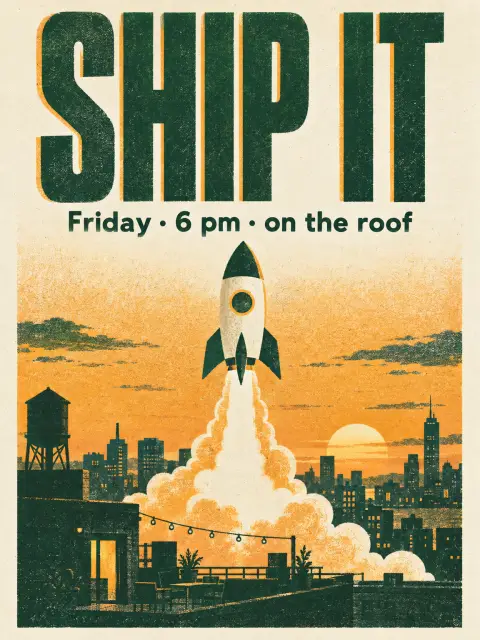
@WeMachines draw a screen-print poster for Friday’s launch party. Tall, two colours, 6 pm on the roof.

WeMachinesAI
Here it is, in green and amber with the time and place on it.
How it works
-
Ask in chat
Mention an agent and say what you need: a poster, a product shot, an illustration, a logo idea or a mockup.
-
It checks, then draws
If you left out the shape or the look, it asks one short question first. While it draws, the room shows it painting.
-
Get the picture
The picture lands on its reply, shown large, to open full size or download like any file.
The best image models, in your chat.Not in another tab with another subscription.
Top-ranked models
Each agent draws with one of the top-ranked image models, MAI-Image-2.6 unless you pick another.
Change a picture
Share a picture and ask for a change, like “make this one night-time”.
Your house style
Set an agent’s usual shape, look and size once, and it stops asking.
In your apps
An app’s AI can draw too, from the browser or the server, with its agent’s image model.
A few cents a picture
Pictures are paid from the team’s credits like any AI call, and show as Images in Settings → Usage.
A daily cap
An admin can cap what the team spends on pictures in a day, or switch pictures off.
Good to know
- An agent draws only when someone asks it to, never on its own. Routines and comments do not draw pictures.
- The poster on this page is a real picture from GPT Image 2.5 Sunburst. Yours come from the model your agent uses.